MIFARE Plus and DESFire Access Card Issuance: Encoding and Programming in Access Control Systems
Card issuance: why issue your own identifiers
Card issuance is the controlled release of access cards by the system owner: each card is programmed with the keys and data of a specific site and registered in the access control system. In Seenaptec Access Platform, an issued card becomes an identifier — an account record linked to a person, while access rights are defined by the assigned pass.
Inexpensive identifiers that are read via their public factory serial number (UID) are vulnerable to cloning: a duplicate can be produced by a consumer-grade emulator in seconds. That is why high-security sites work with the protected memory area of MIFARE Plus and MIFARE DESFire cards: data access is performed using a secret AES-128 key that is unique to the site or the customer. A "foreign" card with the same UID is not recognized by the system as valid — what reaches the system is the contents of the protected area, which cannot be reproduced without knowing the key.
In-house issuance is also a migration tool: a site with a fleet of EM-Marine or MIFARE Classic cards can switch its access points to secure identifiers gradually, without replacing the entire card fleet at once. We described the practice of such a transition in our article on migrating Wiegand systems and secure card issuance.
What is inside a secure card
MIFARE Plus and MIFARE DESFire organize memory differently, and this determines exactly what is written to the card during initialization:
| Parameter | MIFARE Plus | MIFARE DESFire |
|---|---|---|
| Memory structure | Sectors with a key pair and access bits, like MIFARE Classic | File system: applications with their own sets of keys and files |
| Cryptography | SL0–SL3 levels: SL1 is compatible with Classic (Crypto1), SL3 — AES-128 mutual authentication and secure messaging | AES-128 and 3DES, secure messaging, random UID mode |
| What the ACS reads | Contents of the protected sector using the site key | Application file data using the site key |
| Typical role | Step-by-step replacement of a MIFARE Classic card fleet without changing the infrastructure | New projects with maximum isolation of applications and keys |
Card initialization is the transition from its factory state to a "site" state. Programming does three things: the factory (transport) keys are replaced with site keys, a protected area is configured — a sector on MIFARE Plus or an application with files on DESFire — and the identifier code is written into that area. After initialization, the card responds to the system not with an exposed UID but with data that cannot be forged without the key.
The practical meaning of the security levels: the maximum MIFARE Plus SL3 mode moves card–reader authentication to AES, rendering the known attacks on Crypto1 pointless. DESFire is built on strong cryptography from the outset and can additionally report a random UID, which makes it impossible to tie a card to a person by its factory number.
Credential Management: Panel, Templates, and States
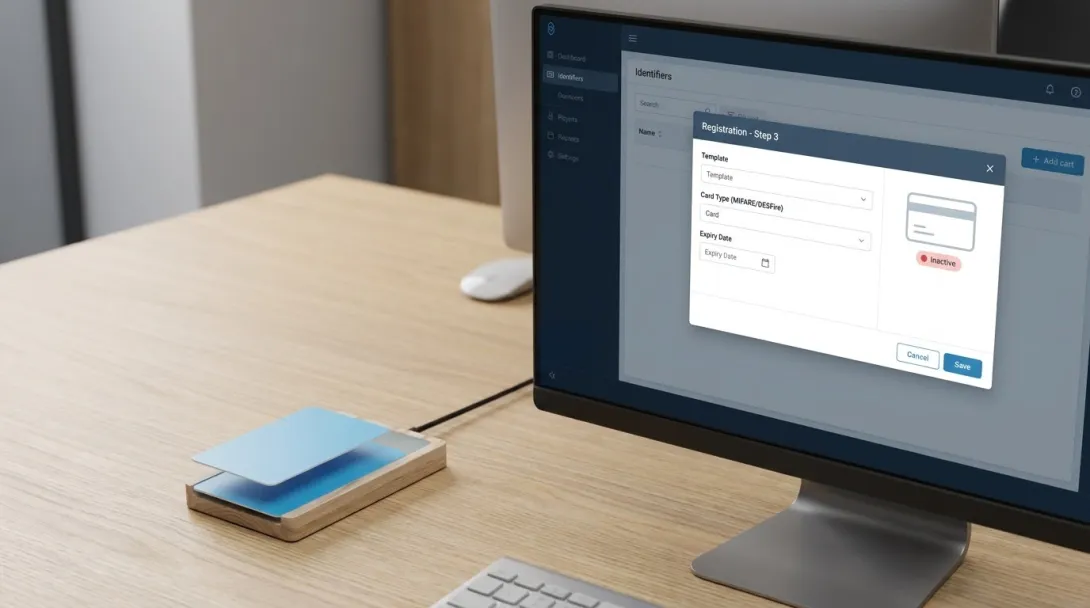
The "Identifiers" panel of the "Passes" workspace tracks access cards independently of issued passes: the list shows the code, validity period, owner, and status of each credential. An identifier can be created in two ways:
- from the "Identifiers" panel — the "+" button opens a dialog where you specify the template, code, type, and validity period. The record is created in the "Inactive" state and is not linked to a person: this is how a stock of issued cards is built up at the badge office, ready to be handed out via the "Issue to current" button or when processing a pass;
- from the person card — in the "Identification" section, a new card is immediately linked to its owner.
The identifier type — "Regular", "Internal", or "Control" — is set by the template. Identifier templates are configured on the toolbar and store the card type plus a validity-period rule: "Unlimited", "For 3 months", "For 6 months", "For a year", or "Until date". For periodic templates, the period counts from the record creation date.
The card lifecycle is transparent through its states: "Active", "Inactive", "Suspended", "Lost", "Withdrawn", "Pending" (the validity period has not started yet), and "Expired". For mass issuance — for example, when launching the system or hiring contractors — cards are created together with personnel via CSV import: a file column is assigned the "Cards" role, and the validity period of the new cards is determined by the selected identifier template.

Card reissuance without access interruption
A lost, damaged, or compromised card is replaced using the "Reissue" operation — from the identifier card or from the "Identification" section of the person card. The new code is entered manually or read with a control reader; the previous code is marked "Will be unlinked" in the meantime.
After saving, the system performs a linked pair of actions: the previous identifier is set to the "Withdrawn" state and unlinked from the person, while the new one is created preserving the type and all associations — the person and the issued passes. Permissions do not need to be rebuilt: passes keep working with the new credential. The new card's validity period mirrors the previous one but counts from the reissue date; a permanent identifier remains permanent. Both events — withdrawal and issuance — are recorded in the log.
The lifecycle is protected by integrity rules: the code of an existing identifier cannot be changed — only reissued; the "Withdrawn" state is irreversible, and a withdrawn card's code remains occupied forever together with its history. A separate case is "Lost": such an identifier is automatically unlinked from the person and can be issued again only after its state is changed, which distinguishes a loss from a routine replacement.
Where issuance is technically protected
Card keys are stored in the secure storage of the "Security" workspace alongside backup passwords, OSDP keys, and HTTPS certificates. A secret's value cannot be read from the interface — it can only be replaced; the creation, modification, and deletion of secrets are recorded in the audit log without their values. A backup that includes secret transfer is flagged in the backup list and stored like a password.
At the field level, AGRG readers and controllers are assigned read profiles — settings that determine which secure area of the card to read and with which keys. Profiles are applied through device settings templates during automated Seenaptec SecureBus discovery, from the device card, or as a bulk operation; devices additionally offer a "secure channel only" mode that prohibits unencrypted exchange.
From the reader to the server, the identifier code travels over an OSDP line with Secure Channel enabled: the initial connection is made with the default key (SCBK-D), then a working key is established, and the "Fully encrypted with automatic key" mode enables regular key rotation without operator involvement. The access decision is always made by the server: the device merely delivers the code, so compromising the credential or the line grants no independent rights — those are determined by the pass in the platform modules. For details on how readers work with protected sectors of different card families, see the overview of the AGRG AXI multi-format reader and the platform documentation.